Key takeaways
- A Framer Shopify agency workflow looks different from a solo merchant's: you're managing licensing across multiple client stores, not just your own catalog.
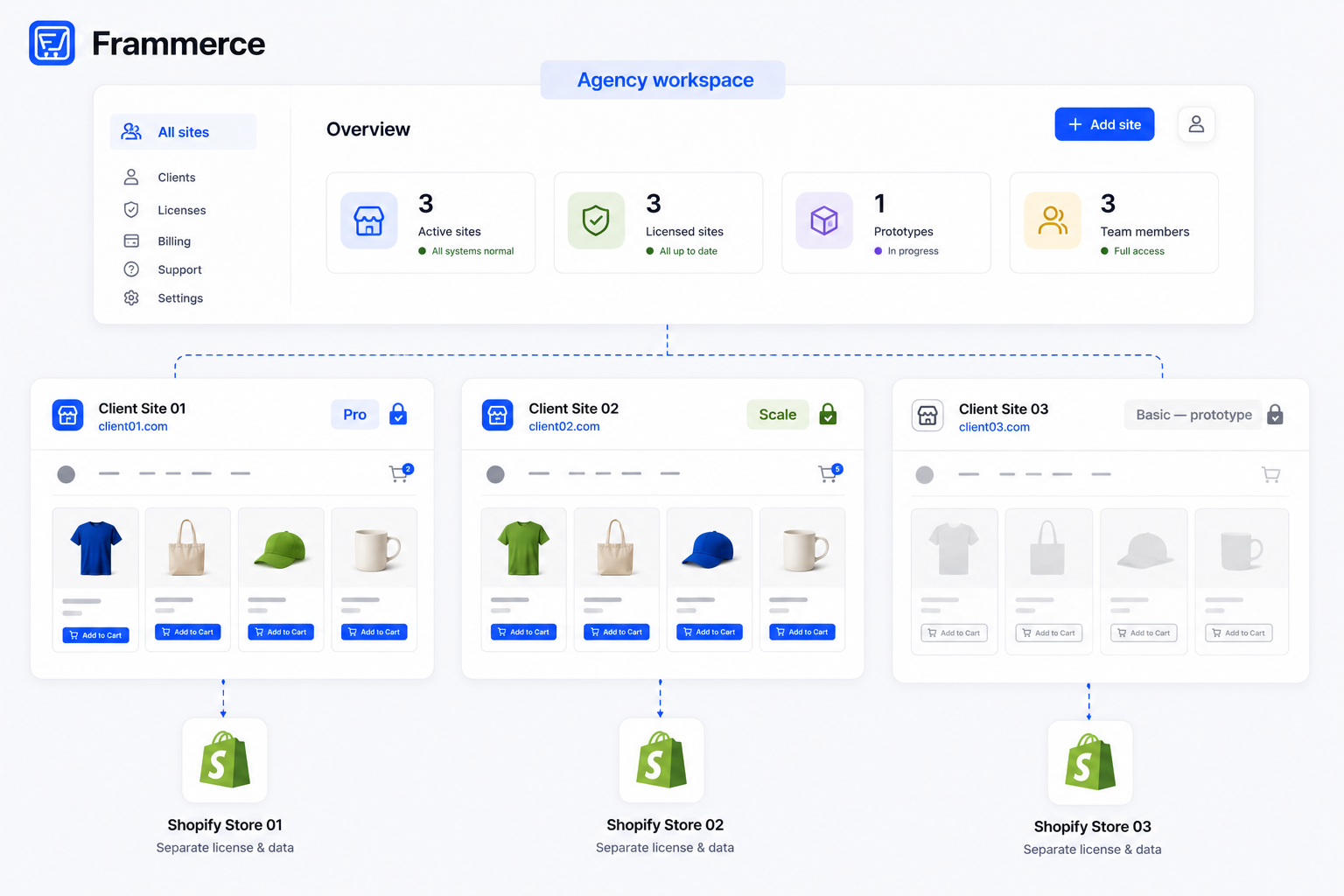
- Each paid client site needs its own Frammerce license. A single Pro or Scale purchase covers one website, per the pricing terms.
- Basic is free, which makes it a genuinely usable pitch and prototype tool: build a client's full storefront against their real Shopify catalog before either of you commits to a paid tier.
- Frammerce's affiliate program pays 30% on every Pro or Scale sale referred through your link, a natural fit if you're already recommending it to clients.
Does Frammerce work for agencies building multiple client stores?
Yes, with one licensing detail to plan around: a paid Frammerce license (Pro or Scale) covers a single website. If you're building for five clients, that's five separate licenses, one per site, not one agency-wide license covering all of them.
That's a different model from a typical agency toolkit that's licensed once per seat or per agency. It matters for how you scope and price client work: the Frammerce license itself is a client-side cost, either passed through directly or built into your project fee, not a shared tool your agency amortizes across every job.
What does a Framer Shopify agency workflow actually look like?
The technical steps are the same ones covered in the setup guide: connect a Shopify store, sync the catalog, drop in product and cart components, publish. If a client asks why you're recommending a plugin over a fully custom build, the plugin vs custom comparison lays out that decision in detail, and the broader Framer ecommerce architecture guide covers the full landscape (plugin, custom API, or CMS-plus-payment-links) if a client is starting from scratch rather than migrating an existing store. If a client asks why Frammerce specifically instead of another Shopify-to-Framer plugin, our plugin comparison lines up the field. And if a client needs the basics of how Framer and Shopify actually divide responsibility explained before any of this makes sense, the Framer vs Shopify FAQ covers that groundwork. What changes for agency and freelance work is everything around those steps.
If the client already runs an existing Shopify store you're redesigning rather than building net-new, the mechanics are closer to a Shopify-to-Framer migration than a fresh setup, since the catalog, orders, and customer data all already exist and just need a new frontend pointed at them. If instead the client has no store yet, starting a Framer online store from scratch covers that baseline before agency-specific licensing enters the picture. And if the client's business is a dropshipping or print-on-demand operation specifically, running that kind of store on Framer carries its own catalog quirks worth knowing going in.
A repeatable agency workflow typically runs:
- 1Scope the engagement first
Confirm with the client whether they already have a Shopify store you'll be migrating or redesigning, or whether you're starting from nothing. At the same time, get a rough sense of how many distinct collections their catalog spans, since that's what determines whether they'll eventually need Scale for multi-collection sync, not just Pro. Getting this wrong at the proposal stage means re-quoting the license tier later.
- 2Prototype on Basic
Use the client's real Shopify catalog if they already have one, or a placeholder catalog if the store is new. Free tier, full 21 components, enough to show a client exactly what the finished storefront will look and behave like. Starting from a Framer ecommerce template rather than a blank canvas can speed up the first draft, and beyond the 21 commerce components, ecommerce forms for Framer covers checkout-adjacent forms worth adding to the prototype too.
- 3Get sign-off on the design and cart behavior
Do this before anyone pays for a license. Because Basic syncs a real catalog and runs real cart state, a client preview is a working preview, not a static mockup.
- 4Upgrade the client's connection to Pro or Scale
Do this once the design is approved and you're ready to enable checkout. This is where the per-website license applies: buy it against the specific site you're launching, and against the collection count you scoped back in step one.
- 5Hand off access, not just a finished file
Clients need to know who owns the Frammerce license, the Shopify store, and the Framer project itself, since all three are separate accounts with separate ownership questions.
- 6Set expectations on post-launch support separately from the license itself
Frammerce's tiers don't include an agency support-retainer concept: Pro includes standard email support and Scale includes priority support, but both go to whoever holds the license account, not to an agency reselling to a client. Any ongoing maintenance or support arrangement you offer the client beyond that is entirely your own agreement to make, not something Frammerce provides.
- 7Document what's Frammerce-managed versus custom-built
Do this for the client's future reference, especially if you won't be the one maintaining the site long-term.
As a quick reference once you've read the full sequence above, the same workflow condenses to:
- Scope first: existing store or new build, and roughly how many collections.
- Prototype for free on Basic, against the real catalog if one exists.
- Get design and cart sign-off before anyone pays for anything.
- Buy Pro or Scale against the specific client site, matched to the collection count.
- Hand off the Framer project, Shopify connection, and Frammerce account explicitly, not just files.
- Agree on post-launch support terms yourselves — Frammerce doesn't provide an agency support tier.
- Document what's Frammerce-managed versus custom-built for whoever maintains the site next.
Steps two and three happen entirely on the free tier, which is what makes Basic a real proposal tool rather than a limited demo, before any license purchase enters the conversation.
Licensing: does each client site need its own Frammerce purchase?
Yes. A Pro or Scale purchase is tied to a single website license. Building for multiple clients means budgeting a separate license per site, the same way you'd budget separately for each client's own Shopify plan or domain.
This is worth stating plainly in a client proposal rather than bundling it invisibly into your fee. Clients who understand that Frammerce is a one-time cost per site, not a recurring one, tend to see it as a straightforward line item rather than a surprise.
How do you hand off a Frammerce-built store to a client?
Handoff for a Frammerce build has three separate ownership threads to close out: the Framer project itself, the Shopify store connection, and the Frammerce license and account. None of the three are automatically bundled, so confirm explicitly who holds each one going forward.
Practically, that means: transfer or share the Framer project under the client's own workspace if they'll manage it going forward, confirm the Shopify Storefront API connection stays authorized after any account changes on either side, and make sure whoever owns the Frammerce license also has access to the component docs and the pricing page for future upgrades, since you likely won't be the one clicking "upgrade to Scale" a year from now.
Should you charge clients a markup, or point them to Frammerce directly?
Either works, and the right call depends on how you've structured the engagement. Some agencies bill the Frammerce license as a straight pass-through cost, itemized on the invoice at $79 or $99. Others fold it into a flat project fee and buy the license themselves.
What doesn't work well is leaving it ambiguous. A client who doesn't know whether they or you own the Frammerce license can't make an informed call later about renewing support, upgrading tiers, or moving the site to a new developer.
Setting up a repeatable Framer Shopify agency workflow
The stores that go smoothly share a pattern: the agency treats Basic as a real proposal tool, not a limited demo. Because Basic includes all 21 components and full CMS sync, a prospective client sees an accurate representation of the finished product, live catalog and all, before anyone has paid anything.
That changes the sales conversation. Instead of pitching a Frammerce-powered Shopify store on mockups and promises, you're showing a working preview against the client's actual products. It shortens the gap between pitch and sign-off, and it means the client isn't approving a design in the abstract, they're approving something that already behaves like the real store. For the layout and conversion patterns worth building toward before you scope the design, what actually makes a Framer Shopify store convert is worth reviewing first.
It also changes how revisions get handled. Because the preview is already wired to live cart and catalog data, a client asking to see a different product arrangement or a different variant layout is a design change inside the same Framer project, not a request to reconnect data or rebuild a mockup from scratch. That tends to compress the revision cycle that otherwise eats into an agency's margin on fixed-fee projects.
Managing several client connections from one workspace is also worth planning for early. Keep each client's Shopify connection, Frammerce license, and Framer project clearly labeled and separated from the start, rather than untangling which credentials belong to which client later. It's a small habit that avoids a real headache once you're running more than two or three active builds at once.
Turning your build work into referral income
If you're already recommending Frammerce to clients as part of your process, the affiliate program is worth setting up alongside it. It pays 30% on every Pro or Scale sale made through your referral link, open to designers, agencies, and freelancers with no traffic minimums or application fees, and commissions pay out monthly with a dashboard to track them.
For an agency doing repeat Shopify-on-Framer work, that's a second, ongoing revenue line attached to a tool you're already specifying in your builds, on top of whatever you charge for the build itself. Since the commission applies to any Pro or Scale purchase made through your link, it works whether the buyer is a current client upgrading their own site or a designer in your network who found Frammerce through a build you shipped.
Can I use one Frammerce account to manage multiple client sites?
You can manage multiple connections from one account, but each paid client site still requires its own Pro or Scale license, since the license itself is tied to a single website, not to the account managing it.
Do I need a Shopify Partner account to build client stores with Frammerce?
No. Frammerce connects through Shopify's Storefront API regardless of whether you or your client holds a Shopify Partner account. A Partner account is a Shopify-side relationship, separate from the Frammerce license itself.
What happens if a client stops paying me but keeps the Frammerce license?
The Frammerce license belongs to whoever purchased it and is tied to the specific website, independent of your relationship with the client. If the client owns the license, they keep access regardless of your ongoing involvement.
Can I resell Frammerce at a markup as part of my package pricing?
Yes, agencies commonly itemize the license cost within a flat project fee. There's no restriction on how you price your own services around it, since Frammerce's one-time pricing is a fixed input cost you're free to structure however fits your business.
Bottom line
A Framer Shopify agency workflow runs on the same components and sync as a solo build, with licensing and handoff as the parts that actually need planning: one paid license per client site, and clear ownership of the Framer project, Shopify connection, and Frammerce account at handoff.
The same risk applies to client stores as any other: checkout friction is what costs revenue, not platform choice. Across 50 studies on cart abandonment, the average sits at 70.22%, worth testing thoroughly before you hand a finished storefront over.
Prototype your next client build for free on Frammerce, check licensing details on the pricing page, or get in touch if you're scoping a multi-site agency build and want specifics before you quote it.