Key takeaways
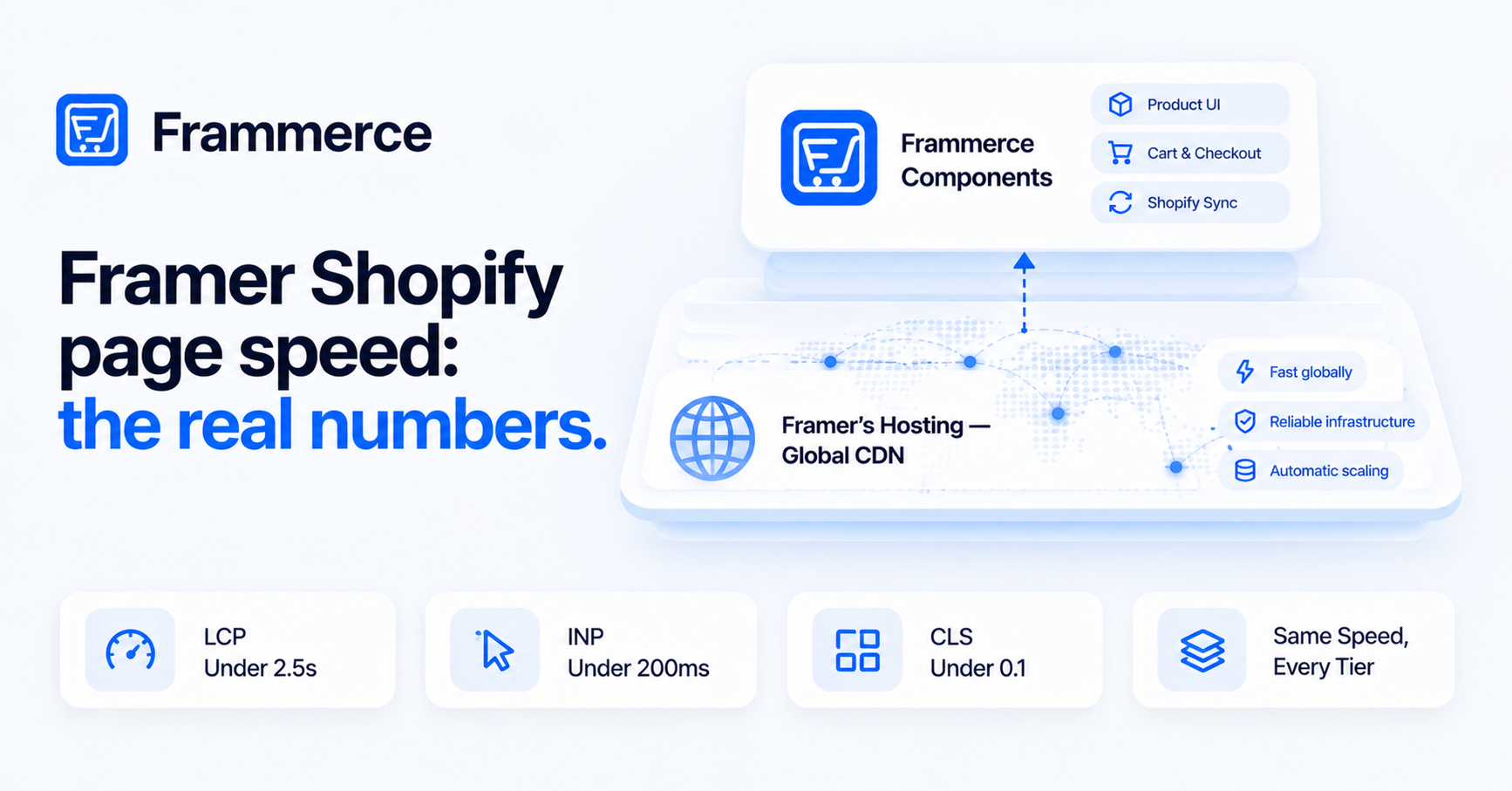
- Framer Shopify page speed depends on Framer's hosting infrastructure first: a global CDN, image optimization, and pre-rendering all run before Frammerce's components ever load.
- Frammerce adds a live cart layer, not a heavy one. It reads from Shopify's Storefront API at runtime, it doesn't ship a second framework or a duplicate rendering engine.
- Google's Core Web Vitals thresholds are the real bar: Largest Contentful Paint under 2.5 seconds, Interaction to Next Paint under 200 milliseconds, Cumulative Layout Shift under 0.1, all measured at the 75th percentile of real visits.
- No made-up benchmark here. What actually moves the needle on a commerce storefront's Largest Contentful Paint and Cumulative Layout Shift, and how to check your own pages against Google's thresholds.
Is Framer Shopify page speed actually fast?
It depends on what's slow, and it's rarely the commerce layer itself. Framer's hosting infrastructure handles the baseline: a global content delivery network, automatic image optimization, and pre-rendered pages. Frammerce's components run inside that same hosting, reading product and cart data from Shopify at runtime rather than shipping a separate rendering stack.
The honest answer is that a Framer Shopify storefront can be fast, and it can also miss Google's thresholds, the same as any site on any platform. What determines the outcome is largely page weight (images, fonts, third-party scripts) and how much render-blocking content sits above the fold, not whether the store happens to sell through Shopify.
What is Framer's hosting infrastructure actually built on?
Framer's own hosting documentation describes a worldwide CDN delivered through AWS CloudFront, with content cached close to visitors to cut latency. Traffic routes automatically to the nearest available location using anycast routing on static IP addresses, on every plan, not a premium tier only.
On the protocol side, Framer supports HTTP/3 (QUIC), HTTP/2, and 103 Early Hints, all aimed at reducing connection setup time before a page even starts rendering. Images are resized and compressed dynamically, with modern formats like AVIF generated without adding time to Time to First Byte. Assets compress with Gzip or Brotli depending on what the visitor's browser supports, and TLS 1.3 is used by default, with a TLS 1.2 fallback for older clients.
Framer also pre-renders: it server-renders the most-visited pages at publish time, and less-visited pages render on their first request, after which every result gets cached globally. That's the infrastructure a Framer Shopify storefront sits on before a single Frammerce component loads.
Where does Frammerce fit into page speed?
Frammerce's components run on top of that hosting layer. Product components bound to a synced CMS collection read data already pulled in at the last sync, no live Shopify call on page load. Cart and checkout components are the ones that talk to Shopify's Storefront API at runtime, since a cart total has to reflect the actual state of the cart, not a cached snapshot. That's a data fetch, not a second application framework layered onto the page.
The practical takeaway: adding product galleries, variant pickers, and a cart drawer to a Framer page doesn't fundamentally change what's making the page fast or slow. The same levers that affect any Framer page (image sizes, font loading, how much sits above the fold) affect a Frammerce-powered page too. There's no separate performance budget to plan around specifically because the storefront sells through Shopify. See the component docs for what each component actually fetches and renders.
What do Core Web Vitals mean for a Shopify storefront in Framer?
Google's Core Web Vitals set the actual bar, and they apply the same way to a Framer Shopify storefront as to any other site. The three metrics: Largest Contentful Paint should land under 2.5 seconds, Interaction to Next Paint should stay under 200 milliseconds, and Cumulative Layout Shift should stay under 0.1. All three are measured at the 75th percentile of real page loads, segmented across mobile and desktop.
For a commerce storefront specifically, Largest Contentful Paint usually comes down to how fast the hero image or main product image renders, since that's typically the largest visible element on a landing or product page. Cumulative Layout Shift is worth watching closely on product pages with variant pickers and price displays, since content that shifts position as data loads (a price that jumps once stock status resolves, for instance) is exactly what this metric penalizes.
What actually drives page speed on a commerce storefront
Rather than quote a benchmark number for a specific site, here's what actually moves Largest Contentful Paint and Cumulative Layout Shift on a Shopify storefront built in Framer, and why.
Largest Contentful Paint on a landing or home page is almost always tied to the hero image or first product image: its file size, its format, and whether it's render-blocked by stylesheets or scripts that have to load first. A pricing or contact page, with less visual weight above the fold, will typically post a faster LCP than a home page for that reason alone, not because of anything specific to the platform. Render-blocking stylesheets and scripts, and unused JavaScript shipped on every page regardless of whether that page needs it, are the two most common culprits behind a slower-than-expected score, and both show up in any standard Lighthouse or PageSpeed Insights report as flagged opportunities.
None of that is a Frammerce-specific problem. It's the same set of issues that shows up on any content-heavy landing page, and it's the same set of fixes: trim what's render-blocking, cut unused script weight, and keep the largest above-the-fold element as light as it can be without losing the design.
If you want real numbers for your own storefront rather than a generic claim, run your live pages through Google's Core Web Vitals tools (PageSpeed Insights or Lighthouse), on the home page and on a representative product or category page, since those tend to carry more images and variant data than the home page does.
What hurts Framer Shopify page speed in practice?
A few things show up consistently, on Frammerce-powered pages and Framer pages generally:
- Unoptimized hero and product imagery. Even with Framer's automatic image optimization, an oversized source image or too many high-resolution product photos above the fold slows down Largest Contentful Paint.
- Render-blocking scripts and stylesheets. Anything that has to load and execute before the page can paint delays every metric downstream of it.
- Layout shift from late-loading data. Prices, stock badges, or variant options that resolve after initial paint can cause a visible jump if their space isn't reserved in advance.
- Too much above the fold. A crowded hero section with multiple images, animations, and text blocks competes for the same initial render budget.
None of these are unique to selling on Shopify through Framer. They're the same performance fundamentals that apply to any content-rich page, commerce or not.
How do you keep a Framer Shopify store fast as your catalog grows?
Catalog size itself doesn't slow down an individual page, since Frammerce's components render whatever data is on that specific page, not your entire catalog at once. What matters is pagination and page structure: a category page showing 24 products loads differently than one trying to render 400 at once.
Reasonable collection sizes per page, lazy-loading images below the fold, and keeping product page templates lean (not stacking every possible component whether a product needs it or not) all help a storefront stay fast as the catalog behind it scales. See the store examples post for what that looks like across real storefront patterns, or the ecommerce guide if you're structuring a storefront from the ground up.
Does adding Frammerce's cart drawer slow down every page?
The cart components run globally, but they read cart state rather than re-fetching your entire catalog on every page. The performance cost is closer to a small data read than a heavy script addition.
Is Framer's hosting the same speed on every pricing plan?
Framer's core hosting infrastructure, its CDN, anycast routing, and protocol support, applies broadly. Advanced hosting features are reserved for enterprise-eligible plans, per Framer's own documentation, but the baseline CDN and optimization layer isn't gated behind a specific tier.
Does Frammerce's free Basic tier perform differently from Pro or Scale?
No, and there's no reason it would. Per the pricing page, the difference between Basic, Pro, and Scale is which features are unlocked, checkout, branding removal, multi-collection sync, support level, not a heavier or lighter build of the components themselves. Every tier runs the same components on the same Framer hosting underneath.
Where should I actually test my Framer Shopify store's speed?
Google's own Core Web Vitals tools measure the metrics that matter: Largest Contentful Paint, Interaction to Next Paint, and Cumulative Layout Shift, ideally on real product and category pages, not just the home page, since those often carry more images and variant data.
Bottom line
Framer Shopify page speed comes down to the same fundamentals as any commerce site: a solid hosting layer underneath (Framer's global CDN, pre-rendering, and image optimization), and disciplined page weight on top of it. Frammerce's components add a live cart and catalog layer without adding a second rendering stack, but they don't override poor image choices or a crowded hero section either.
A slow page costs you before a shopper ever reaches checkout, and checkout itself is where most of the damage happens anyway. Across 50 studies on cart abandonment, the average sits at 70.22%, so speed is worth fixing, but it's one piece of a larger conversion picture, not the whole one.
Build your storefront on Frammerce and test real pages against Google's thresholds as you go, check the pricing page for tier details, or get in touch if a specific page is underperforming and you want a second look.