

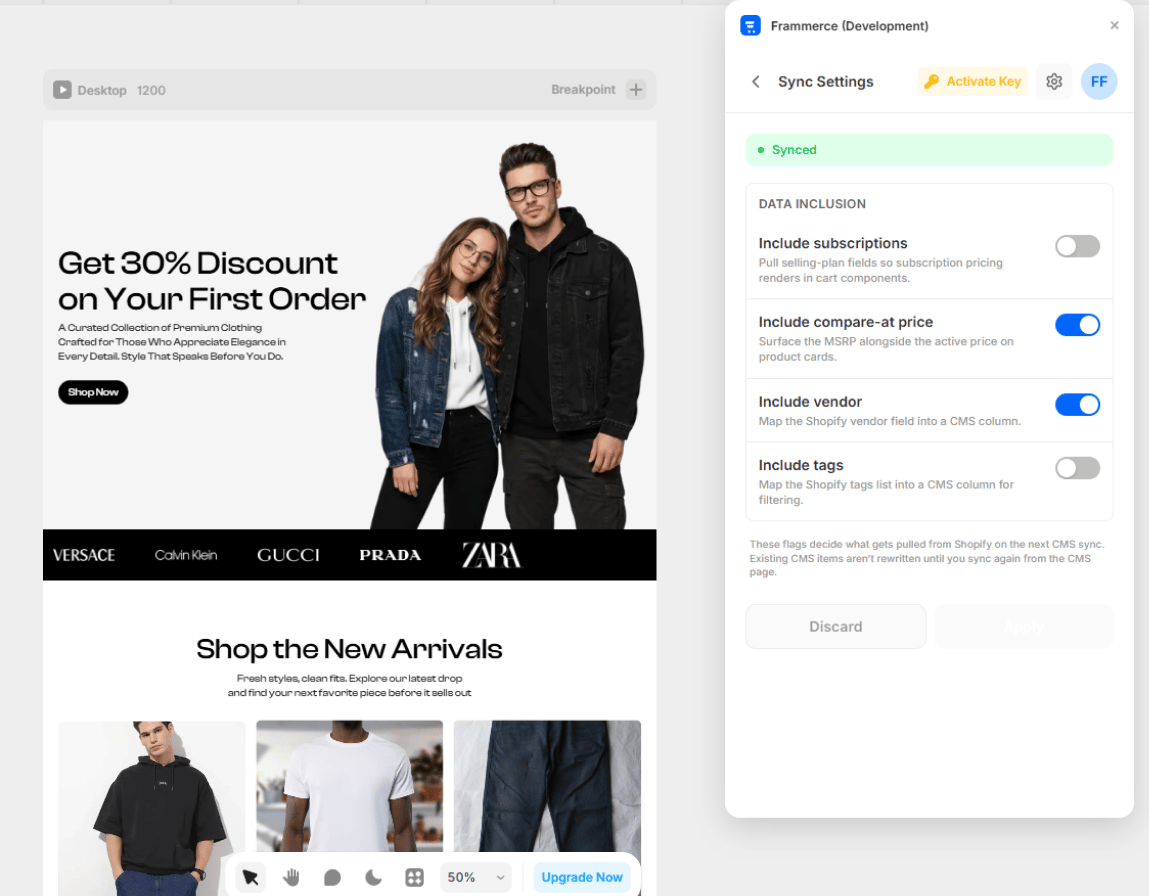
Toggles
Frammerce ships four data-inclusion toggles. Each is off by default; turn one on when you actually use that data in your store.Include subscriptions
Pulls Shopify selling plans so subscription pricing renders correctly in cart components.Turn on if you sell subscription products via Shopify Subscriptions.
Include compare-at price
Surfaces the MSRP alongside the active price on product cards (the struck-through price).Turn on if you run sales and want to show original prices.
Include vendor
Maps the Shopify vendor field into a CMS column.Turn on if you want to filter or display by vendor (multi-brand stores, marketplaces).
Include tags
Maps the Shopify tags list into a CMS column for filtering.Turn on if you use Shopify tags to categorise products.
Draft → Apply
Sync Settings uses a draft → apply flow, not auto-save.1
Toggle a switch
Your change goes into the draft. A status pill at the top shows the pending count.
2
Hit Apply
The green Apply button promotes draft → applied →
pluginData. Once applied, your changes affect the next CMS sync.3
Or hit Discard
Rolls the draft back to the last applied state.
These flags decide what gets pulled from Shopify on the next CMS sync. Existing CMS items aren’t rewritten - re-sync to apply changes to already-synced products.
When to revisit
You typically set these once. Common reasons to revisit:- Launching subscriptions → enable Include subscriptions
- Running a promo with strikethrough prices → enable Compare-at price
- Adding multi-vendor support → enable Vendor
- Building filtered collection pages → enable Tags