

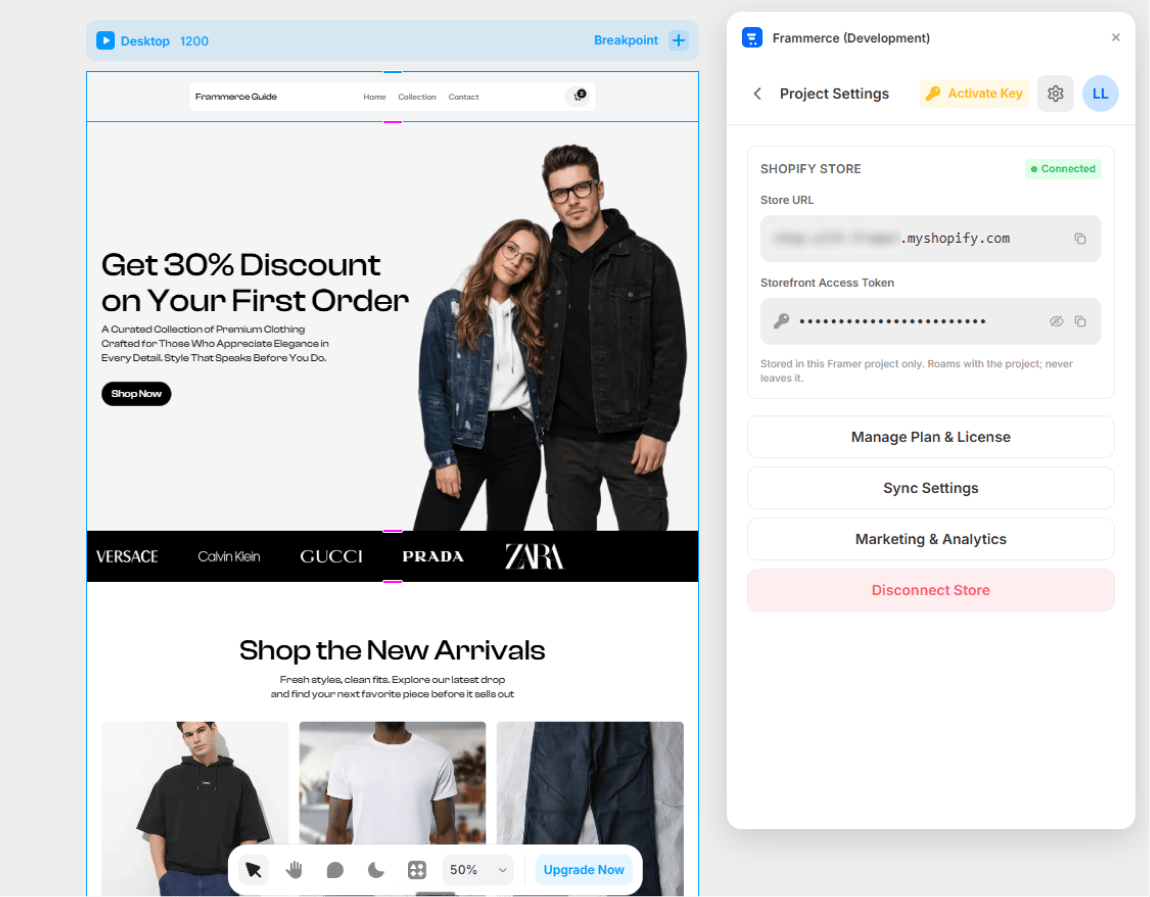
What’s on the page
When a Shopify store is connected, Settings shows:- Store URL (read-only) - your
.myshopify.comdomain - Storefront Access Token (read-only, masked) - reveal/copy buttons available
- Manage Plan & License button - opens the Pricing screen
- Sync Settings button - opens Sync Settings
- Disconnect Store button - two-tap confirm
Credentials are read-only
The credentials block in Settings is display-only on purpose. Editing happens through reconnecting:- Disconnect the current store
- Open the CMS page
- Paste new credentials → Connect
Credentials live in this Framer project’s
pluginData. They travel with the project to anyone you share it with; they never leave Framer’s storage for Frammerce servers.Reveal & copy
The token field has two buttons:- Eye toggle - reveals/hides the token (defaults to masked dots)
- Copy - copies the raw token to your clipboard
Disconnect Store
Disconnecting is a two-tap confirm to avoid accidental disconnects:- First click: button changes to “Click again to confirm”
- Second click within 4 seconds: actually disconnects
- Clears credentials from the Framer project’s
pluginData - Removes the cart runtime config script from
headStart - Removes the “Powered by Frammerce” badge (if present)
- Delete already-synced CMS items (those persist in the Framer collection)
- Affect your Shopify store in any way
When to disconnect
- Switching to a different Shopify store
- Removing the plugin from this project
- Handing the project off and you want the new owner to use their own credentials
- Before removing a license key (the plugin enforces this)