> ## Documentation Index
> Fetch the complete documentation index at: https://frammerce.com/docs/llms.txt
> Use this file to discover all available pages before exploring further.
# Settings
> Per-project credentials, plan management, sync settings, and disconnecting your store.
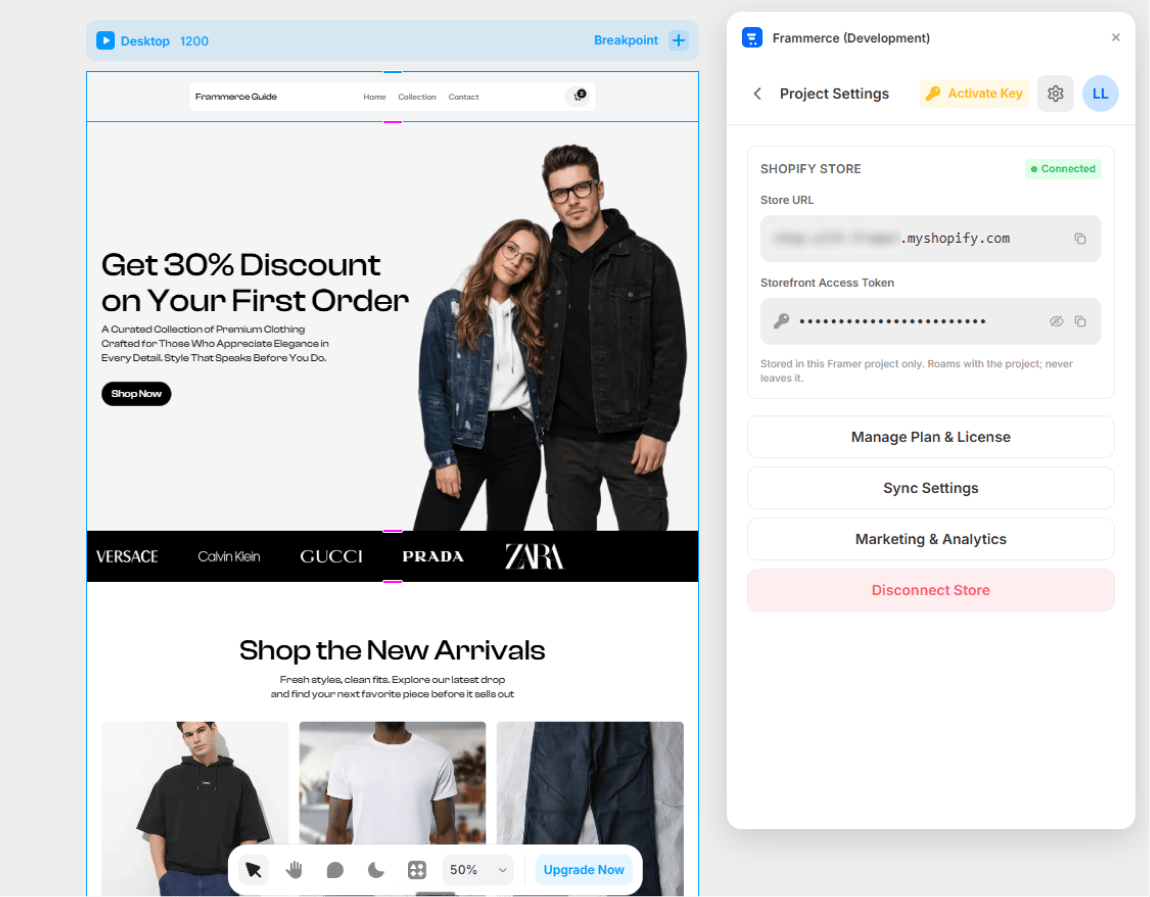
The **Settings** page in the plugin panel is the per-project control center. Open it from the panel's bottom navigation.
 ## What's on the page
When a Shopify store is connected, Settings shows:
* **Store URL** (read-only) - your `.myshopify.com` domain
* **Storefront Access Token** (read-only, masked) - reveal/copy buttons available
* **Manage Plan & License** button - opens the Pricing screen
* **Sync Settings** button - opens [Sync Settings](/docs/sync-settings)
* **Disconnect Store** button - two-tap confirm
When no store is connected, the credentials block hides and the disconnect button is replaced with a **Connect Store** button that routes to the CMS page.
## Credentials are read-only
The credentials block in Settings is **display-only on purpose**. Editing happens through reconnecting:
1. Disconnect the current store
2. Open the **CMS** page
3. Paste new credentials → Connect
This avoids partial edits that put the runtime in a half-broken state.
Credentials live in this Framer project's `pluginData`. They travel with the project to anyone you share it with; they never leave Framer's storage for Frammerce servers.
## Reveal & copy
The token field has two buttons:
* **Eye toggle** - reveals/hides the token (defaults to masked dots)
* **Copy** - copies the raw token to your clipboard
The mask is fixed-width so toggling never reflows the row, and the dots don't leak the real token length.
## Disconnect Store
Disconnecting is a **two-tap confirm** to avoid accidental disconnects:
1. First click: button changes to "Click again to confirm"
2. Second click within 4 seconds: actually disconnects
What disconnect does:
* Clears credentials from the Framer project's `pluginData`
* Removes the cart runtime config script from `headStart`
* Removes the "Powered by Frammerce" badge (if present)
It does **not**:
* Delete already-synced CMS items (those persist in the Framer collection)
* Affect your Shopify store in any way
## When to disconnect
* Switching to a different Shopify store
* Removing the plugin from this project
* Handing the project off and you want the new owner to use their own credentials
* Before removing a license key (the plugin enforces this)
## What's on the page
When a Shopify store is connected, Settings shows:
* **Store URL** (read-only) - your `.myshopify.com` domain
* **Storefront Access Token** (read-only, masked) - reveal/copy buttons available
* **Manage Plan & License** button - opens the Pricing screen
* **Sync Settings** button - opens [Sync Settings](/docs/sync-settings)
* **Disconnect Store** button - two-tap confirm
When no store is connected, the credentials block hides and the disconnect button is replaced with a **Connect Store** button that routes to the CMS page.
## Credentials are read-only
The credentials block in Settings is **display-only on purpose**. Editing happens through reconnecting:
1. Disconnect the current store
2. Open the **CMS** page
3. Paste new credentials → Connect
This avoids partial edits that put the runtime in a half-broken state.
Credentials live in this Framer project's `pluginData`. They travel with the project to anyone you share it with; they never leave Framer's storage for Frammerce servers.
## Reveal & copy
The token field has two buttons:
* **Eye toggle** - reveals/hides the token (defaults to masked dots)
* **Copy** - copies the raw token to your clipboard
The mask is fixed-width so toggling never reflows the row, and the dots don't leak the real token length.
## Disconnect Store
Disconnecting is a **two-tap confirm** to avoid accidental disconnects:
1. First click: button changes to "Click again to confirm"
2. Second click within 4 seconds: actually disconnects
What disconnect does:
* Clears credentials from the Framer project's `pluginData`
* Removes the cart runtime config script from `headStart`
* Removes the "Powered by Frammerce" badge (if present)
It does **not**:
* Delete already-synced CMS items (those persist in the Framer collection)
* Affect your Shopify store in any way
## When to disconnect
* Switching to a different Shopify store
* Removing the plugin from this project
* Handing the project off and you want the new owner to use their own credentials
* Before removing a license key (the plugin enforces this)