> ## Documentation Index
> Fetch the complete documentation index at: https://frammerce.com/docs/llms.txt
> Use this file to discover all available pages before exploring further.

# Components

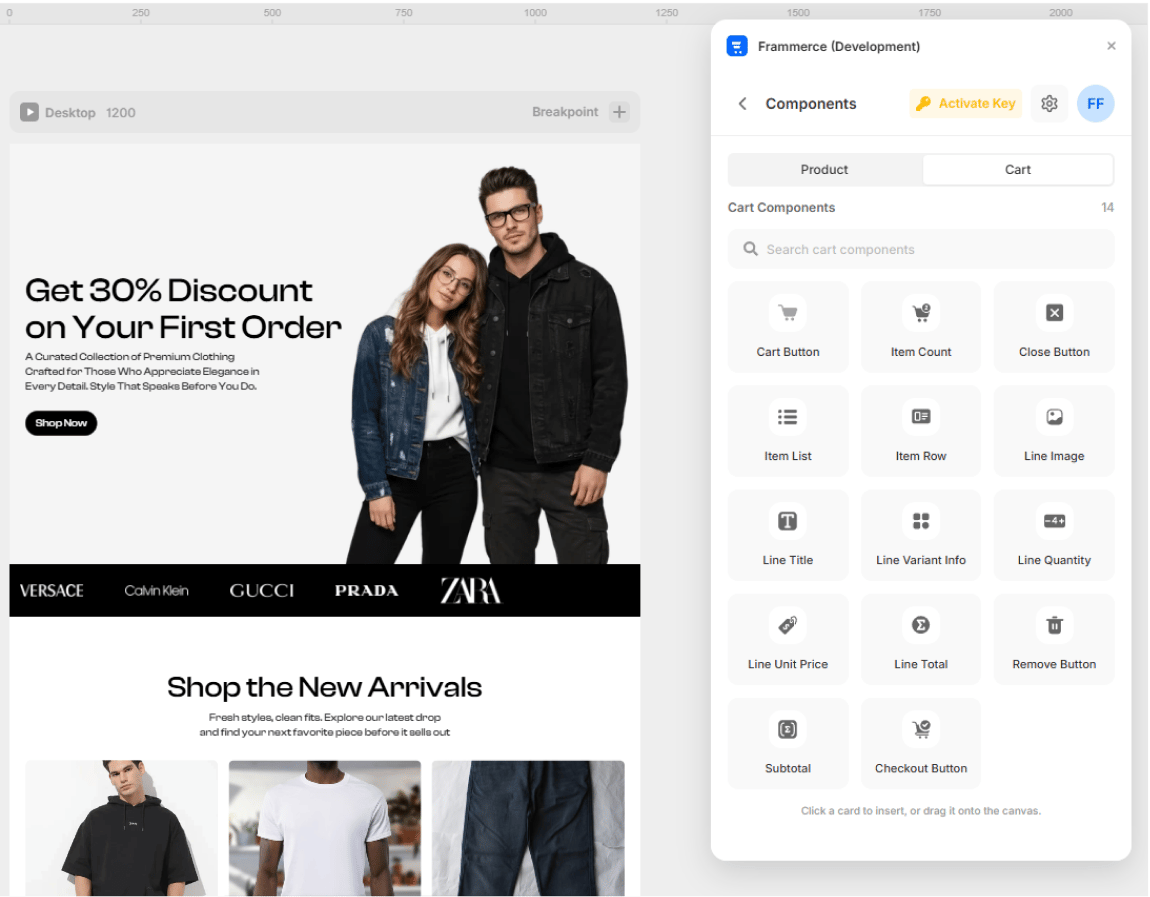
> The 21 production-ready components Frammerce ships - 7 product blocks and 14 cart blocks.
<Frame>
  <img src="https://mintcdn.com/framergeeks-5082ee09/N10R_Z8p3wsemciR/images/components-panel.png?fit=max&auto=format&n=N10R_Z8p3wsemciR&q=85&s=d2e37522753acdb5e135e2d642879696" alt="Frammerce Components screen with Product/Cart tabs and the catalog grid" width="1150" height="897" data-path="images/components-panel.png" />
</Frame>

Every Frammerce component is a published Framer code component. You can:

* **Click** a card in the Components panel to insert at the current canvas position
* **Drag** a card directly onto the artboard
* **Style** it with Framer's regular layer tools (colors, layout, breakpoints)

All components subscribe to the same cart runtime, so they stay in sync across pages automatically.

<Note>
  **All 21 components are available on every plan.** Design and preview your full storefront on the Free tier - upgrade to Pro or Scale only when you're ready to accept real orders.
</Note>

## Product components (7)

Used on product detail pages and product cards.

<CardGroup cols={2}>
  <Card title="Product Gallery" icon="https://mintcdn.com/framergeeks-5082ee09/N10R_Z8p3wsemciR/images/components/product/product-gallery-light.svg?fit=max&auto=format&n=N10R_Z8p3wsemciR&q=85&s=b7fd7d8b5e430300e40509062f913d2a" width="16" height="16" data-path="images/components/product/product-gallery-light.svg">
    Main image + thumbnails for the active product.
  </Card>

  <Card title="Product Price" icon="https://mintcdn.com/framergeeks-5082ee09/N10R_Z8p3wsemciR/images/components/product/product-price-light.svg?fit=max&auto=format&n=N10R_Z8p3wsemciR&q=85&s=91a64e6dd255e143905cf671fbce7b8e" width="16" height="16" data-path="images/components/product/product-price-light.svg">
    Active price, optional compare-at strikethrough.
  </Card>

  <Card title="Variant Picker" icon="https://mintcdn.com/framergeeks-5082ee09/N10R_Z8p3wsemciR/images/components/product/variant-picker-light.svg?fit=max&auto=format&n=N10R_Z8p3wsemciR&q=85&s=7a7474ad626be871ff1a5b63850b4178" width="16" height="16" data-path="images/components/product/variant-picker-light.svg">
    Size / colour / material option swatches.
  </Card>

  <Card title="Quantity Input" icon="https://mintcdn.com/framergeeks-5082ee09/N10R_Z8p3wsemciR/images/components/product/product-quantity-light.svg?fit=max&auto=format&n=N10R_Z8p3wsemciR&q=85&s=3303693c516b5572b99b2a7b9217449e" width="16" height="16" data-path="images/components/product/product-quantity-light.svg">
    Steppers to set the buy quantity.
  </Card>

  <Card title="Stock Status" icon="https://mintcdn.com/framergeeks-5082ee09/N10R_Z8p3wsemciR/images/components/product/product-stock-light.svg?fit=max&auto=format&n=N10R_Z8p3wsemciR&q=85&s=8ac9248a0427c8ba4fd085e452579b7e" width="16" height="16" data-path="images/components/product/product-stock-light.svg">
    In-stock / low / sold-out indicator.
  </Card>

  <Card title="Add to Cart" icon="https://mintcdn.com/framergeeks-5082ee09/N10R_Z8p3wsemciR/images/components/product/add-to-cart-light.svg?fit=max&auto=format&n=N10R_Z8p3wsemciR&q=85&s=35fb33c4c005968559a8ee16d5bb8be7" width="16" height="16" data-path="images/components/product/add-to-cart-light.svg">
    Reactive button that adds the variant to the cart.
  </Card>

  <Card title="Buy Now" icon="https://mintcdn.com/framergeeks-5082ee09/N10R_Z8p3wsemciR/images/components/product/buy-now-light.svg?fit=max&auto=format&n=N10R_Z8p3wsemciR&q=85&s=3ffe5a8f5e605002ede2838e68e12efe" width="16" height="16" data-path="images/components/product/buy-now-light.svg">
    Skip-the-cart instant Shopify checkout.
  </Card>
</CardGroup>

## Cart components (14)

Used to build the cart drawer or cart page.

<CardGroup cols={2}>
  <Card title="Cart Button" icon="https://mintcdn.com/framergeeks-5082ee09/N10R_Z8p3wsemciR/images/components/cart/cart-button-light.svg?fit=max&auto=format&n=N10R_Z8p3wsemciR&q=85&s=dca3d61be24f69dcfa61423a75f4034c" width="16" height="16" data-path="images/components/cart/cart-button-light.svg">
    Opens the cart drawer from the navbar.
  </Card>

  <Card title="Item Count Badge" icon="https://mintcdn.com/framergeeks-5082ee09/N10R_Z8p3wsemciR/images/components/cart/item-count-light.svg?fit=max&auto=format&n=N10R_Z8p3wsemciR&q=85&s=da8ff7c3cbe6b9bac1874a72f394eca2" width="16" height="16" data-path="images/components/cart/item-count-light.svg">
    Live total item count, updates everywhere.
  </Card>

  <Card title="Cart Close Button" icon="https://mintcdn.com/framergeeks-5082ee09/N10R_Z8p3wsemciR/images/components/cart/close-button-light.svg?fit=max&auto=format&n=N10R_Z8p3wsemciR&q=85&s=cae5d2c500f58823dbfffe603e470e81" width="16" height="16" data-path="images/components/cart/close-button-light.svg">
    Dismisses the cart drawer.
  </Card>

  <Card title="Cart Item List" icon="https://mintcdn.com/framergeeks-5082ee09/N10R_Z8p3wsemciR/images/components/cart/item-list-light.svg?fit=max&auto=format&n=N10R_Z8p3wsemciR&q=85&s=6fe6a53af98c9b99c750cfe0de367453" width="16" height="16" data-path="images/components/cart/item-list-light.svg">
    Renders every line in the cart.
  </Card>

  <Card title="Cart Item Row" icon="https://mintcdn.com/framergeeks-5082ee09/N10R_Z8p3wsemciR/images/components/cart/item-row-light.svg?fit=max&auto=format&n=N10R_Z8p3wsemciR&q=85&s=09b8aa4d4c9e4386fb4fab469c3df615" width="16" height="16" data-path="images/components/cart/item-row-light.svg">
    Layout shell for a single cart line.
  </Card>

  <Card title="Line Image" icon="https://mintcdn.com/framergeeks-5082ee09/N10R_Z8p3wsemciR/images/components/cart/line-image-light.svg?fit=max&auto=format&n=N10R_Z8p3wsemciR&q=85&s=977ed99f638fa3a396cf1422585e33cb" width="16" height="16" data-path="images/components/cart/line-image-light.svg">
    Product thumbnail for a cart row.
  </Card>

  <Card title="Line Title" icon="https://mintcdn.com/framergeeks-5082ee09/N10R_Z8p3wsemciR/images/components/cart/line-title-light.svg?fit=max&auto=format&n=N10R_Z8p3wsemciR&q=85&s=61be3b7cc939dddacac9dca57e9809d7" width="16" height="16" data-path="images/components/cart/line-title-light.svg">
    Variant-aware product name.
  </Card>

  <Card title="Line Variant Info" icon="https://mintcdn.com/framergeeks-5082ee09/N10R_Z8p3wsemciR/images/components/cart/line-variant-info-light.svg?fit=max&auto=format&n=N10R_Z8p3wsemciR&q=85&s=ecdc718db5de7db39552808331f4c630" width="16" height="16" data-path="images/components/cart/line-variant-info-light.svg">
    Selected options summary (Black / Medium).
  </Card>

  <Card title="Line Quantity Stepper" icon="https://mintcdn.com/framergeeks-5082ee09/N10R_Z8p3wsemciR/images/components/cart/line-quantity-light.svg?fit=max&auto=format&n=N10R_Z8p3wsemciR&q=85&s=fdc5e4a7e0e6a634f8e00596bed4152f" width="16" height="16" data-path="images/components/cart/line-quantity-light.svg">
    Inline +/- to change the line quantity.
  </Card>

  <Card title="Line Unit Price" icon="https://mintcdn.com/framergeeks-5082ee09/N10R_Z8p3wsemciR/images/components/cart/line-unit-price-light.svg?fit=max&auto=format&n=N10R_Z8p3wsemciR&q=85&s=f0e058fb76b5f789fa6beb2dbc4d657c" width="16" height="16" data-path="images/components/cart/line-unit-price-light.svg">
    Per-item formatted price.
  </Card>

  <Card title="Line Total Price" icon="https://mintcdn.com/framergeeks-5082ee09/N10R_Z8p3wsemciR/images/components/cart/line-total-light.svg?fit=max&auto=format&n=N10R_Z8p3wsemciR&q=85&s=4d988f7ba95ea247a9f416a7130eab5e" width="16" height="16" data-path="images/components/cart/line-total-light.svg">
    Quantity × unit price.
  </Card>

  <Card title="Remove Button" icon="https://mintcdn.com/framergeeks-5082ee09/N10R_Z8p3wsemciR/images/components/cart/remove-button-light.svg?fit=max&auto=format&n=N10R_Z8p3wsemciR&q=85&s=345dfc5b42e54a3119295965b3ad1a9b" width="16" height="16" data-path="images/components/cart/remove-button-light.svg">
    Removes a line from the cart.
  </Card>

  <Card title="Cart Subtotal" icon="https://mintcdn.com/framergeeks-5082ee09/N10R_Z8p3wsemciR/images/components/cart/line-subtotal-light.svg?fit=max&auto=format&n=N10R_Z8p3wsemciR&q=85&s=6a3116bb157d55499c6c3d854f74a375" width="16" height="16" data-path="images/components/cart/line-subtotal-light.svg">
    Currency-formatted total (pre-tax, pre-shipping).
  </Card>

  <Card title="Checkout Button" icon="https://mintcdn.com/framergeeks-5082ee09/N10R_Z8p3wsemciR/images/components/cart/checkout-button-light.svg?fit=max&auto=format&n=N10R_Z8p3wsemciR&q=85&s=316f4efbf07ca9922a0b089251e35941" width="16" height="16" data-path="images/components/cart/checkout-button-light.svg">
    Hands the cart off to Shopify checkout. **Gated by plan tier.**
  </Card>
</CardGroup>

## Where the paid tier kicks in

All the components are included in every plan, including the Free plan. In the Free plan the **checkout functionality** is the one piece that's missing - to unlock it and start taking real orders, upgrade to **Pro** or **Scale**.

To know more about our Pro and Scale plans, visit the [pricing page](https://frammerce.dev/pricing).
