> ## Documentation Index
> Fetch the complete documentation index at: https://frammerce.com/docs/llms.txt
> Use this file to discover all available pages before exploring further.
# CMS Sync
> Pull your Shopify catalog into a Framer managed collection. Field picker and re-syncing.
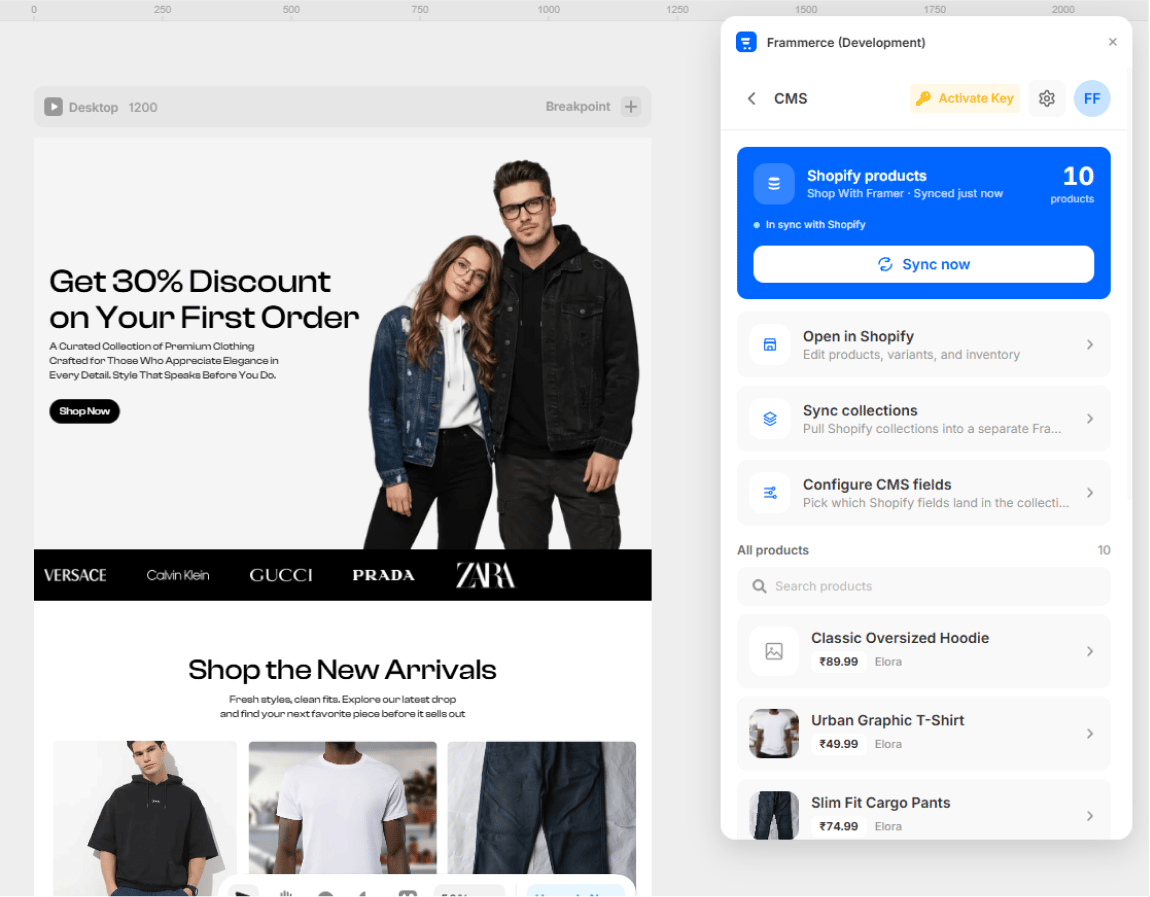
Frammerce can sync your Shopify products into a **Framer managed collection** so your designers can lay out product pages with the CMS they already know. You decide which fields land in the collection, and you can re-sync any time your store changes.
## Open the CMS screen
In the plugin panel, click **CMS**. If you haven't connected a store yet, the connect form appears here.
 ## Field picker
Before the first sync, choose which Shopify fields land on each CMS row.
* Product **title**
* Product **handle**
* **Description** (HTML)
* **Featured image**
* **Variants** (with prices and availability)
* **Compare-at price** (MSRP shown alongside the active price)
* **Vendor**
* **Tags** (mapped as a CMS column for filtering)
* **Selling plans** (subscription pricing for cart components)
These are all controlled from [Sync Settings](/docs/sync-settings).
## Run a sync
Hit **Sync products**. Frammerce will:
1. Fetch every published product from your Storefront API
2. Map the fields per your Sync Settings
3. Upsert them into the Framer managed collection
4. Show the count synced and any new vs updated items
The Storefront API only exposes products that are published to your storefront. Drafts and unlisted products are skipped.
## Re-syncing
You can re-sync any time. Sync is idempotent:
* Existing CMS items are updated in place (same Framer ID)
* New products are inserted
* Products removed from Shopify are not auto-deleted from the CMS (see Troubleshooting if you need this)
Toggle compare-at price, vendor, tags, and subscription support.
## Using synced products on the canvas
Once products are in the CMS, you can:
1. Build a **Collection page** in Framer that lists the products
2. Build a **Product detail page** that reads variant/price/image from the CMS row
3. Drop Frammerce **Product** components (Gallery, Price, Variant Picker, etc.) and bind them to CMS variables
Each Frammerce product component will also fall back to live Storefront API data if no CMS context is provided.
## Field picker
Before the first sync, choose which Shopify fields land on each CMS row.
* Product **title**
* Product **handle**
* **Description** (HTML)
* **Featured image**
* **Variants** (with prices and availability)
* **Compare-at price** (MSRP shown alongside the active price)
* **Vendor**
* **Tags** (mapped as a CMS column for filtering)
* **Selling plans** (subscription pricing for cart components)
These are all controlled from [Sync Settings](/docs/sync-settings).
## Run a sync
Hit **Sync products**. Frammerce will:
1. Fetch every published product from your Storefront API
2. Map the fields per your Sync Settings
3. Upsert them into the Framer managed collection
4. Show the count synced and any new vs updated items
The Storefront API only exposes products that are published to your storefront. Drafts and unlisted products are skipped.
## Re-syncing
You can re-sync any time. Sync is idempotent:
* Existing CMS items are updated in place (same Framer ID)
* New products are inserted
* Products removed from Shopify are not auto-deleted from the CMS (see Troubleshooting if you need this)
Toggle compare-at price, vendor, tags, and subscription support.
## Using synced products on the canvas
Once products are in the CMS, you can:
1. Build a **Collection page** in Framer that lists the products
2. Build a **Product detail page** that reads variant/price/image from the CMS row
3. Drop Frammerce **Product** components (Gallery, Price, Variant Picker, etc.) and bind them to CMS variables
Each Frammerce product component will also fall back to live Storefront API data if no CMS context is provided.